
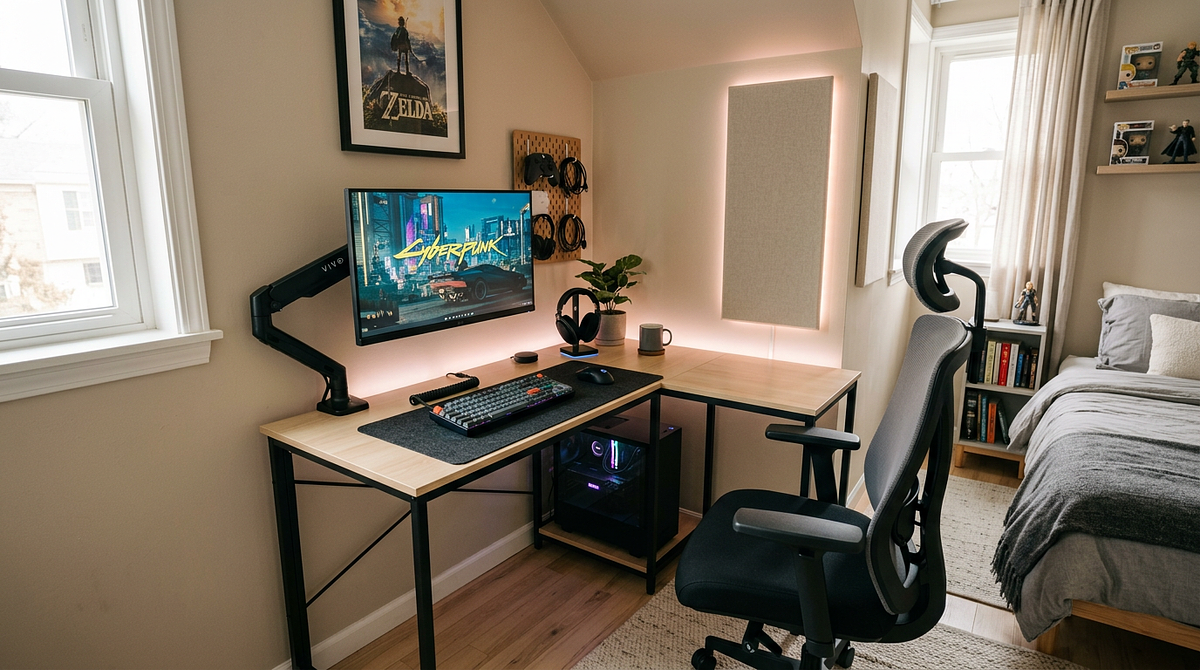
Gaming setup ideas for small rooms come down to three things: how you arrange your furniture, what equipment you choose, and how you handle storage in a tight space. This guide covers layout strategies, desk options, cable management, and storage solutions for rooms of different sizes, with budgets ranging from $200 to $1,000 or more. By the end, you’ll have enough to plan and build a gaming setup that actually fits your space and your budget.
You’ll find measurement-based layout strategies, furniture recommendations at different price points, and practical tips built specifically for small gaming spaces. That includes how to measure your space accurately, which desk configurations fit your room, how to keep clutter under control, and how to manage cables when you don’t have much room to work with.
Measuring Your Space and Determining Minimum Requirements
Before you buy anything, you need accurate measurements and a clear sense of how much space each type of setup actually requires. This saves you from buying furniture that doesn’t fit and helps you figure out which layouts will work in your room.
How to Measure Your Gaming Space Effectively
Grab a tape measure and record your room’s full length and width in feet. Note any irregular shapes, alcoves, or architectural features that eat into your usable floor space. Then identify your obstructions: door swing radius (usually 36 inches), window locations, heating vents, electrical outlets, and any built-in furniture that limits where a desk can go.
From there, calculate your usable gaming zone by subtracting those obstruction areas from your total floor space. You’ll want at least 24 to 30 inches of clearance behind your chair so you can move comfortably. Also check your ceiling height and wall space, since both affect whether wall-mounted monitor arms or overhead shelving are realistic options for your setup.
Minimum Space Requirements by Setup Type
Different gaming configurations need different amounts of space to work comfortably. Knowing these minimums upfront helps you avoid planning a setup that won’t physically fit in your room.
| Setup Type | Minimum Floor Space | Desk Dimensions | Clearance Required | Best For |
|---|---|---|---|---|
| Single Monitor PC | 4′ x 4′ (16 sq ft) | 40-48″ W x 24″ D | 30″ behind chair | Rooms 8×10 or larger |
| Dual Monitor PC | 5′ x 4′ (20 sq ft) | 55-60″ W x 24-30″ D | 30″ behind chair | Rooms 10×10 or larger |
| Console + TV | 6′ x 4′ (24 sq ft) | 48-55″ W x 20″ D | 36″ viewing distance | Rooms 10×10 or larger |
| Corner L-Desk Setup | 5′ x 5′ (25 sq ft) | 48-60″ per side | 30″ behind chair | Rooms with corner access |
Room Size Categories and Layout Viability
8×10 Rooms (80 sq ft): These compact spaces work for single monitor setups with 40-48″ desks pushed against the longest wall. Corner configurations are possible if your door placement allows diagonal desk positioning, but you’ll need vertical storage since there’s not much floor space left for extra furniture.
10×10 Rooms (100 sq ft): This size handles dual monitor setups with 55-60″ desks or L-shaped corner configurations without much trouble. You’ll have room for a small bookshelf or storage cabinet next to your desk while still keeping proper chair clearance and enough space to move around.
10×12 Rooms (120 sq ft): These larger small rooms support full dual monitor setups with room for additional storage furniture. The extra square footage lets you separate your gaming zone from other parts of the room, like sleeping or storage areas, and gives you enough flexibility for console and PC hybrid setups with proper viewing distances.
Optimal Desk Placement Strategies for Small Rooms
Where you put your desk has a big impact on both how much space you have and how comfortable your setup feels. Different placement options work better depending on your room’s shape and dimensions.
Corner Desk Configurations
Putting your desk in a corner is the most space-efficient option for rooms 10×10 or smaller. It uses space that would otherwise sit empty, frees up the center of the room for movement, and naturally creates an L-shaped workspace that fits dual monitors or a monitor and console side by side.
A corner setup also faces you into the room rather than directly at a wall, which makes small spaces feel less closed in. Corner desks typically span 48 to 60 inches per side and need a minimum 5×5 foot floor area including chair clearance. They work best when the corner isn’t blocking natural light from a nearby window.
You’ll need to keep the corner at least 36 inches away from your door’s swing radius, and cable management gets a bit more complicated since you’re working near two walls. Still, corner setups give you more desk surface per square foot of floor space than any other configuration for small rooms.
Wall-Mounted and Floating Desk Solutions
Wall-mounted desks have no floor-based legs, which opens up the floor and makes very tight rooms (under 80 square feet) feel more open. They take up 20 to 30% less floor space than a standard desk and leave room underneath for rolling carts or small filing cabinets that slide all the way under.
Fewer visible furniture legs also makes a small room look less cluttered. Wall mounting also lets you set the exact height you want during installation, which is good for ergonomics. The desk needs to mount into wall studs that can hold 100 to 150 lbs (desk plus equipment), and depth is usually limited to 20 to 24 inches because of how cantilever supports work.
Wall-mounted desks aren’t a good fit for rentals unless your landlord approves, and they’re harder to move around later compared to freestanding furniture. Think through those trade-offs before you commit to drilling into the wall.
Traditional Wall-Adjacent Desk Placement
Pushing a desk against a single wall still works well in rooms 10×10 or larger when a corner isn’t available or isn’t what you want. This approach makes the most sense when you have one long, uninterrupted wall (10 to 12 feet), when you need a 55 to 60″ straight desk for dual monitors, or when you simply prefer facing a wall while you game.
Center the desk on the wall to keep the room looking balanced. Placing it opposite the door tends to feel more comfortable and less exposed. Leave 30 to 36 inches behind your chair so you can get in and out easily, and use the wall space above your desk for monitor arms, shelving, and cable management.
Budget-Tiered Complete Setup Recommendations
You can build a solid small-space gaming setup at several different price points. Each tier trades off between new purchases, DIY options, and space-saving features.
$200-$300 Budget: Starter Setup
At this budget, the goal is a working gaming space with the basics, no premium features. Start with a 40 to 48″ basic computer desk ($60 to $80) or a DIY option using a countertop with adjustable legs ($50 to $70). Pair it with an entry-level office chair with basic lumbar support ($70 to $100), or a repurposed dining chair with an added cushion ($20 to $30).
Use the stand that came with your monitor instead of buying a separate arm. Add a single 3-tier bookshelf ($30 to $50) for vertical storage of games and peripherals. Basic cable management with adhesive cable clips and zip ties ($10 to $15) keeps things tidy without spending much.
At this price point, stick to a compact 40 to 48″ desk width to leave room for your chair, go vertical with storage instead of adding more floor furniture, and consider a DIY desk, which typically costs 30 to 40% less than a pre-built one.
$500-$700 Budget: Optimized Mid-Tier Setup
This tier gets you better ergonomic furniture and some space-saving equipment upgrades that make a real difference in comfort and how the room feels. Go with a 48 to 55″ desk with built-in cable management ($150 to $200) or an L-shaped corner desk ($180 to $250), and pair it with a mid-range ergonomic chair with adjustable armrests and lumbar support ($150 to $200). For a deeper look at how to position your chair, desk, and monitor for long sessions, see this ergonomic gaming setup guide covering monitor positioning, desk height, and chair adjustments.
Add a monitor arm ($30 to $50) to free up desk surface, and combine wall-mounted shelves ($40 to $60) with an under-desk rolling storage cart ($50 to $70). A cable management tray and sleeve system ($25 to $40) hides most of your wires, and LED strip lighting ($20 to $35) adds ambient backlighting without taking up any floor space.
The monitor arm alone reclaims 12 to 18 inches of desk depth for your keyboard and mouse. A corner L-desk gives you a lot of surface area within a compact 5×5 foot footprint, and an under-desk rolling cart keeps peripherals accessible without permanently using up floor space.
$1000+ Budget: Premium Space-Maximized Setup
At this level, you’re getting high-end space-saving solutions and premium ergonomic gear that covers every part of a small-room gaming setup. Consider an electric standing desk (48 to 60″) with programmable height presets ($400 to $600) or a premium corner workstation with integrated storage ($500 to $700). Pair it with a high-end ergonomic chair with full adjustability ($300 to $500).
Install a dual monitor arm ($80 to $120) that supports two 24 to 27″ displays with independent movement, and add a custom modular shelving system ($150 to $250) or wall-mounted cabinet units ($200 to $300). A premium cable management system with a powered desk grommet ($60 to $80) and wireless charging cuts visible wire clutter down to almost nothing. A smart RGB lighting system ($80 to $120) with app control lets you set different lighting scenes.
For shared living spaces, sound-absorbing panels ($100 to $150) help with noise without taking up floor space. The standing desk removes the need for a separate standing workspace, dual monitor arms support larger screens with zero desk footprint, and modular storage adapts as your setup changes without requiring new furniture.
Space-Saving Furniture and Equipment Solutions
The furniture and equipment you choose can make a 30 to 50% difference in how much usable space you have in a small gaming room. Some options are just much more efficient than others.
Monitor Arms and Display Mounting
A monitor arm is probably the single biggest space-saving upgrade you can make to a small gaming setup. It reclaims 12 to 24 inches of desk depth and gives you better ergonomic control over your display position. It also lets you swing the monitor completely off the desk when you’re not gaming, which frees up the surface for other things.
A good single monitor arm for 24 to 32″ displays up to 20 lbs runs $30 to $80. Dual monitor arms support two 24 to 27″ displays using a single desk clamp, fitting within a 48 to 55″ desk width. You can mount them side by side or stack them vertically, which works well on narrower 40 to 48″ desks. Premium dual arms ($80 to $150) hold 15 to 20 lbs per arm and have cable management channels built into the arm itself.
Full wall mounts take up zero desk surface but require permanent installation into studs. Articulating wall mounts ($40 to $100) let you pull the monitor out and swivel it for flexible viewing angles.
Vertical Storage and Organization Systems
Going vertical keeps your floor clear while making games, accessories, and peripherals easy to reach. Floating shelves (12 to 24″ deep) installed 18 to 24 inches above your desk hold headsets, controllers, and decorative items without touching your desk surface. Corner shelving units put otherwise unused corner wall space to work for game collections and peripheral storage.
Pegboard systems with hooks and baskets are easy to reconfigure as your needs change. Under the desk, rolling storage carts (12 to 18″ wide) slide completely out of sight and give you drawer space for cables, manuals, and small accessories. Mounted cable management trays attach to the underside of your desk and hide power strips and excess cable length.
Slim filing cabinets (12 to 15″ deep) fit under most desks and keep valuable equipment secure. Hanging organizers on desk edges or sides hold controllers, headsets, and frequently used items within arm’s reach. Overhead shelving mounted 6 to 12 inches below the ceiling stores seasonal items and rarely used gear without taking up mid-level wall space.
Compact and Multi-Functional Furniture
Furniture that does more than one job reduces how many pieces you need while keeping your setup fully functional. Built-in keyboard trays reclaim 18 to 24 inches of desk surface when the keyboard slides underneath during non-gaming time. Integrated monitor shelves raise your display 3 to 4 inches and create storage space underneath for external drives, controllers, or small speakers.
Desk hutches add 12 to 18 inches of vertical storage directly above your workspace without any additional floor footprint. Fold-down desk extensions give you temporary extra surface for a laptop or paperwork, then fold flat when you’re done. Armless office chairs are 4 to 6 inches narrower than standard chairs, which helps in tight spaces. Chairs with compact bases (20 to 22″ diameter) save 6 to 8 inches of floor space compared to oversized gaming chairs (26 to 28″).
Folding guest chairs store flat against a wall or in a closet when you’re not doing multiplayer sessions. Ottoman-style seating with internal storage gives you both a seat and a place to stash equipment in one piece.
Cable Management and Clutter Reduction Techniques
Cable management matters more in small gaming spaces than in larger ones. Visible wire clutter looks worse in a tight room, and loose cables eat into surface space you can’t afford to lose.
Under-Desk Cable Organization
Hiding cables under your desk surface gets rid of 80 to 90% of visible wire clutter while keeping everything accessible when you need to make changes. Wire mesh trays (12 to 24″ length) mount underneath the desk and hold power strips while routing cables horizontally along the underside. J-channel cable raceways attach to the back edge of the desk and create a clean vertical drop path from desktop to floor.
Adhesive cable clips secure individual wires to the desk underside every 12 to 18 inches to prevent sagging and tangling. Mount your power strip inside a cable tray rather than on the floor, which cuts cable length requirements by 24 to 36 inches. Use power strips with widely spaced outlets (1.5 to 2″ spacing) so large AC adapters don’t block the outlets next to them.
Position the power strip in the center of the desk underside to keep cable runs to peripherals as short as possible. Label each outlet with the device it’s connected to so troubleshooting is easier later.
Desktop Cable Routing Solutions
Cables that have to stay on your desk surface, like those for your keyboard, mouse, and headset, need a different approach than under-desk concealment. Neoprene cable sleeves bundle 3 to 5 cables into a single managed run from desktop to desk edge. Spiral cable wraps let you remove individual cables without unwrapping everything.
Weighted cable holders keep mouse and keyboard cables from sliding off the desk edge when you move your devices. Velcro ties to manage cable length cut 12 to 24 inches of excess slack that would otherwise pile up on your desk. Wireless keyboard and mouse options remove 2 to 3 desktop cables entirely, though you’ll need to keep up with batteries. A wireless headset removes what’s usually the largest single cable obstruction in a gaming setup. If you’re weighing whether to go wireless for your mouse, the wired vs wireless gaming mouse performance comparison covers latency, polling rates, and which option suits different setups.
2.4GHz wireless peripherals have lower latency than Bluetooth, which matters for gaming. Wireless charging pads for compatible devices reduce cable connections by 1 to 2 per device.
Wall-Based Cable Concealment
Running cables along walls and behind furniture hides the wire runs between your desk and wall outlets or entertainment center. Paintable plastic channels (0.5 to 1″ wide) mount along baseboards and route cables from your desk to the outlet. Larger 2 to 3 inch channels fit multiple cable runs at once, including ethernet, power, and display cables.
Corner connectors and junction boxes create clean cable paths around room edges. White or paintable finishes let the channels blend into your walls so they’re barely noticeable. Route cables behind desks, bookshelves, or dressers to reach wall outlets without visible floor-level wire runs, and use adhesive clips to secure wires to the backs of furniture as guide points.
Leave 2 to 3 inches of clearance between furniture and walls to fit cable thickness without creating awkward gaps. Group cables together with velcro ties every 18 to 24 inches to keep them from separating and tangling behind furniture. For a more detailed walkthrough of tools and techniques, the gaming desk cable management guide for beginners covers product recommendations and step-by-step approaches at different budget levels.
Building Your Small-Space Gaming Setup With Confidence
A good small-room gaming setup comes down to smart furniture choices, vertical storage, and solid cable management, not trying to cram full-sized equipment into a space that can’t hold it. The measurement-based templates and budget recommendations in this guide give you a clear starting point for rooms from 80 to 120 square feet. Corner configurations and monitor arms will give you the biggest space-saving gains.
Start by measuring your space accurately and matching your room to the right layout category, then choose your desk size and placement from there. For more help with specific furniture products and advanced organization techniques, check out related resources on compact gaming desk reviews and small-room ergonomic setups.
Frequently Asked Questions About Small-Room Gaming Setups
Can I fit a dual monitor setup in an 8×10 room?
Yes, dual monitors can work in an 8×10 room if you use a corner L-desk or a 55 to 60″ straight desk along the longest wall. You’ll need monitor arms to reclaim desk surface space and keep 30 inches of clearance behind your chair.
What’s the smallest functional desk size for PC gaming?
A 40×24″ desk is the minimum for single monitor PC gaming with a standard keyboard and mouse. A 48×24″ desk is noticeably more comfortable and gives you better peripheral placement without adding much to your floor footprint.
How do I reduce echo and noise in a small gaming room?
Mount 2 to 4 acoustic foam panels on the walls near your gaming position, add an area rug under your desk and chair, and hang fabric wall hangings or curtains to absorb sound reflections. Hard surfaces in small rooms create echo fast, so soft materials help a lot.
Should I use a standing desk in a small gaming room?
Standing desks work well in small rooms since they remove the need for a separate standing workspace. Just make sure you have 6 to 8 feet of ceiling clearance and that the desk at full height won’t interfere with overhead lighting or ceiling fans.
What lighting works best for small gaming setups?
LED strip lights mounted behind your monitor or along desk edges give you ambient backlighting without using any desk or floor space. Clip-on desk lamps work well for task lighting and come off easily when you don’t need them.
How do I prevent my small gaming room from overheating?
Good airflow in a small gaming space comes down to working with your room’s existing ventilation rather than against it. Keep exhaust paths clear, position a desk fan where it counts, and don’t let furniture block the airflow your PC depends on. If you want to take your setup further, looking into dedicated gaming room layouts can help you get both comfort and performance right from the start.