
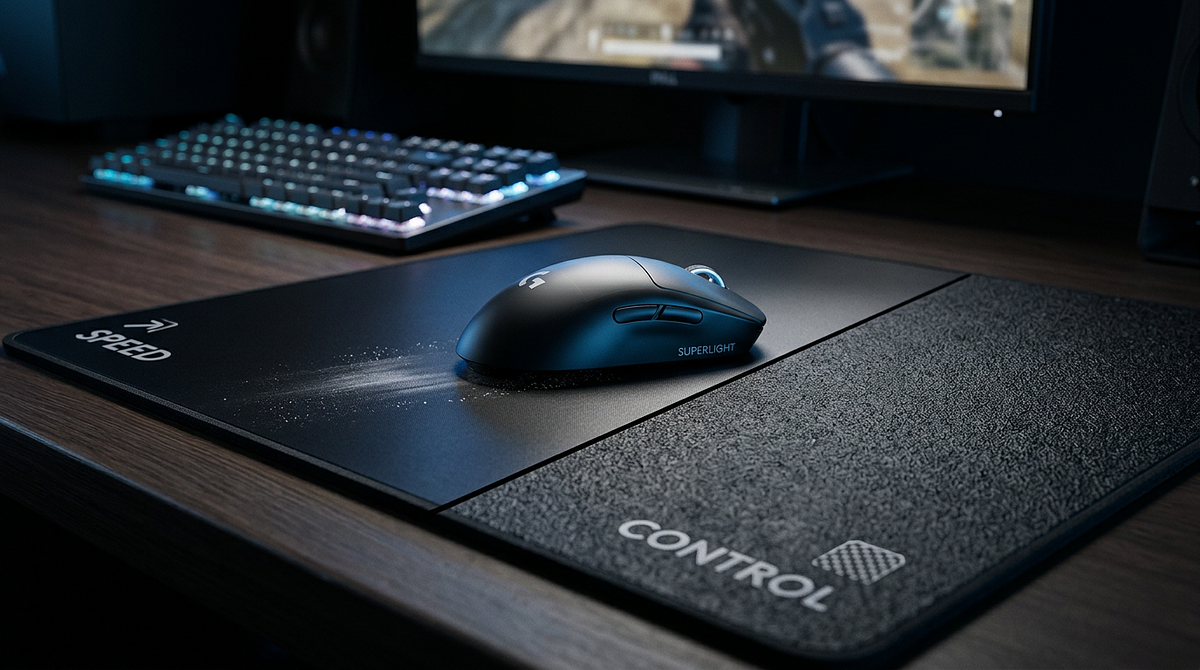
The speed vs control mousepad difference comes down to surface friction and how it changes the way your mouse moves and stops. Speed pads use low-friction materials for smooth, effortless gliding, while control pads have textured surfaces that create resistance for more precise stopping. This page covers how those friction differences work in practice, how each pad type compares, and how factors like mouse weight and DPI interact with different surfaces. By the end, you’ll know which pad type fits your playstyle and feel confident making a choice.
The Material Science Behind Speed and Control Mousepad Friction
The speed vs control mousepad difference starts with how surface materials interact with mouse feet. Three factors determine friction: fabric weave density, surface texture, and coating. Understanding these physical properties explains why mousepads feel so different during actual gameplay.
How Fabric Construction Creates Friction Differences
Speed mousepads use tightly woven fabrics with smooth, uniform surfaces that reduce contact points between mouse skates and the pad. The threads are densely packed and often treated with low-friction coatings, or made from slick synthetic materials like polyester blends. This construction reduces both static friction (the force needed to start moving) and dynamic friction (resistance while the mouse is in motion), which creates that characteristic glide feel speed pads are known for.
Control mousepads use looser weaves with textured or rougher surface finishes that increase contact points. These pads often use cotton-blend fabrics or materials with deliberate surface irregularities that create more resistance. That extra friction gives you tactile feedback and stopping power, making it easier to stop your mouse exactly where you want without overshooting your target.
Static vs Dynamic Friction in Mousepad Performance
Two types of friction explain how pads behave during gameplay. Static friction is the force needed to start moving your mouse from a resting position. Dynamic friction is the resistance you feel while the mouse is already moving.
Speed pads reduce both, so you need minimal force to get moving and the glide stays smooth throughout. Control pads increase both, so you need more force to start moving, but the consistent resistance helps prevent overshooting. You’ll notice this difference when you’re holding an angle in a tactical shooter versus tracking a fast-moving target across your screen.
Hybrid mousepads try to split the difference by using moderate weave densities and selective surface treatments. They typically have lower static friction (easy to start moving) with moderate dynamic friction (enough resistance for controlled stops), which makes them a solid option for players who switch between game genres.
How Rubber Base Composition Affects Performance
The rubber base under the fabric also affects performance, though less directly than the top surface. Natural rubber bases grip desks well but can compress slightly, which affects how the fabric responds to pressure. Polyurethane bases are firmer and keep surface tension more consistent, though they may not grip the desk as well.
Base composition matters because pressing down on your mouse during precise aim adjustments compresses the pad slightly. Control pads with softer bases can add a little extra sinking resistance, while speed pads typically use firmer bases to keep the glide consistent even under pressure. That interaction between base firmness and surface friction contributes to the overall feel of each pad type.
Speed vs Control vs Hybrid Mousepad Comparison
Friction level directly affects tracking smoothness, stopping precision, and how quickly you can adjust your aim. This comparison breaks down the practical differences you’ll notice during gameplay.
| Characteristic | Speed Mousepad | Control Mousepad | Hybrid Mousepad |
|---|---|---|---|
| Surface Friction | Minimal (low static & dynamic) | High (increased resistance) | Moderate (balanced) |
| Mouse Glide Feel | Effortless, slick movement | Deliberate, tactile resistance | Smooth with noticeable feedback |
| Stopping Power | Requires precise muscle control | Strong natural stopping | Moderate stopping assistance |
| Best For | Fast tracking, wide flicks | Micro-adjustments, angle-holding | Mixed gameplay styles |
| Adjustment Period | 3-5 days from control pads | 5-7 days from speed pads | 2-4 days from either type |
Speed Mousepad Characteristics and Performance
Speed mousepads shine when you need rapid, sweeping movements across large distances. The low-friction surface lets you track fast-moving targets with minimal physical effort, which makes them a good fit for games where enemies move unpredictably or where you need to pull off 180-degree flicks regularly.
The main challenge with speed pads is stopping precisely. Because there’s almost no natural resistance, you have to build solid muscle memory to stop your mouse exactly on target. Players with shaky hands or inconsistent muscle control tend to overshoot at first, though most adapt within 3-5 days of regular use.
Speed pads work best with:
- Low to medium mouse weights (under 70g)
- Medium to high DPI settings (1600-3200)
- Arm-aiming playstyles with large mousepads
- Games requiring constant target switching like Apex Legends or Overwatch 2
Control Mousepad Characteristics and Performance
Control mousepads trade raw speed for precision. The surface friction helps you make micro-adjustments and hold steady crosshair positions. The extra resistance acts as a natural brake, making it much easier to stop your mouse exactly where you intend without overshooting.
That stopping power comes at a cost. Starting a movement takes more force, and sweeping across large distances feels less effortless than on a speed pad. Players who rely on fast flicks or need to track highly mobile targets may find control pads tiring during long sessions. If you’re also weighing whether a hard vs soft mouse pad surface suits your playstyle, that decision interacts closely with the speed vs control choice.
Control pads work best with:
- Medium to heavy mouse weights (70-90g+)
- Low to medium DPI settings (400-1600)
- Wrist-aiming or hybrid aiming styles
- Games emphasizing crosshair placement like CS2, Valorant, or Rainbow Six Siege
Hybrid Mousepad Characteristics and Performance
Hybrid mousepads try to capture the benefits of both categories by balancing friction levels. They’re easier to get moving than control pads while offering more stopping assistance than speed pads. That makes them a versatile pick for players who switch between game genres or haven’t settled on a dominant playstyle yet.
The tradeoff is that hybrid pads don’t excel at either extreme. They won’t match the effortless glide of a dedicated speed pad or the rock-solid stopping power of a control pad. But their balanced nature means shorter adjustment periods (typically 2-4 days) when switching from either pure type, which makes them practical for players who rotate between tactical shooters and faster-paced games.
Choosing the Right Mousepad Type for Your Gaming Profile
Picking between speed and control mousepads means matching surface friction to your specific gaming profile. Three things drive the decision: game genre requirements, your natural aiming style, and your current mouse setup. Generic recommendations only go so far. You need to look at how these factors interact with your actual gameplay.
Game Genre and Mousepad Type Matching
Different game genres demand different aiming skills, which makes certain mousepad types a better fit. Speed mousepads work well in battle royales like Apex Legends or Warzone where you need fast target acquisition across varied distances, arena shooters like Quake that demand rapid 180-degree turns, and hero shooters like Overwatch 2 with highly mobile characters. Any game where tracking moving targets matters more than holding static angles benefits from lower friction.
Control mousepads work well in tactical shooters like CS2 and Valorant that focus on crosshair placement and angle-holding, precision-focused games like Rainbow Six Siege where micro-adjustments decide outcomes, and games with one-shot-kill mechanics that reward pixel-perfect aim. If you hold positions more than you chase targets, higher friction gives you the stopping power you need.
Hybrid mousepads work for mixed game libraries spanning multiple genres, games that combine tracking and precision like Destiny 2 or Hunt: Showdown, players still developing their preferred playstyle, and situations where you switch between aggressive and defensive roles within the same game.
Self-Assessment Testing Methodology
Rather than guessing which pad type suits you, run this 5-minute test with your current setup. Load an aim trainer like Aimlabs or KovaaK’s, or use a practice range in your main game. Test tracking by following moving targets for 60 seconds and note whether your mouse feels too slow or if you overshoot frequently.
Test static clicking by hitting stationary targets rapidly and watch whether you consistently overshoot or undershoot. Check for fatigue after 10 minutes of continuous aiming. Excessive arm tiredness suggests too much friction for your style. Also pay attention to your natural tendency: do you instinctively make large, sweeping movements or small, controlled adjustments?
If you consistently overshoot and prefer large movements, you probably need more friction (control or hybrid). If you undershoot and your mouse feels sluggish, you need less friction (speed or hybrid). This kind of practical testing reveals your actual needs better than any theoretical recommendation.
Mouse Weight and DPI Compatibility
Your mouse specs interact with mousepad friction to shape the overall feel. Lightweight mice (under 60g) pair naturally with speed pads because low mouse mass combined with low friction creates effortless movement. Using a lightweight mouse on a control pad can feel like fighting the surface, since you’re applying force to overcome friction without the mouse weight to help maintain momentum.
Heavy mice (over 80g) do better on control pads because the mouse weight provides natural momentum that helps overcome static friction. Speed pads with heavy mice can feel unstable, since the extra mass creates more momentum than the low friction can easily manage, which leads to overshooting during quick adjustments.
Medium-weight mice (60-80g) work well with any pad type, making them a good choice for players still figuring out their preference or those using hybrid pads. This weight range gives you enough mass for control without creating too much momentum on speed surfaces. Understanding how your mouse connects to your system can also matter here — our wired vs wireless gaming mouse performance comparison covers how connection type affects overall mouse behavior.
Switching Between Pad Types and Long-Term Performance
Switching from one mousepad type to another takes time because your muscle memory has to recalibrate to the new friction level. How long that takes depends on how big the friction gap is between your old and new pad. Bigger differences mean longer adjustment times.
Adjustment Periods When Switching Pad Types
Going from speed to control is the hardest adjustment because you’re adding significant resistance. Your muscle memory expects effortless glide, so you’ll initially apply too much force and feel like your mouse is stuck in mud. Drop your in-game sensitivity by 5-10% temporarily to compensate for the extra friction, then gradually bring it back to normal as you adapt over 5-7 days.
Going from control to speed feels less jarring than adding friction, but you’ll overshoot targets often during the first 3-5 days. Your muscle memory is still applying force suited for higher resistance, which causes excessive movement on the low-friction surface. Bump your in-game sensitivity up by 5-10% temporarily to reduce the physical distance you need to move, then dial it back down as your muscle control improves.
Hybrid transitions take the shortest time (2-4 days) because the friction difference is less extreme. Most players notice improved consistency within 2-3 days without any sensitivity adjustments, which makes hybrid pads practical for players who frequently switch between different gaming setups or locations.
Performance Degradation Patterns Over Time
All mousepads change over time as materials wear, though the pattern differs by type. Speed pads typically slow down as the smooth surface picks up microscopic debris and the fabric weave loosens slightly. This happens gradually and usually becomes noticeable after 12-18 months of daily use. Cleaning every 2-3 months extends the lifespan significantly by removing debris that increases friction.
Control pads can go either way depending on build quality. Lower-quality control pads may develop smooth dead spots where friction drops off, while high-quality pads hold consistent texture for 18-24 months. The textured surface resists debris buildup better than speed pads, but the texture itself can wear down with heavy use.
Hybrid pads generally hold their balanced feel longer than pure types because moderate friction levels are less sensitive to minor surface changes. You can expect 15-20 months of consistent performance with proper maintenance. For all pad types, following a proper guide on how to clean a mouse pad without damaging it — hand-wash with mild detergent and lukewarm water, scrub gently in circular motions, then air-dry completely flat — helps preserve the original surface texture.
Matching Friction to Your Gaming Profile Maximizes Performance
The speed vs control mousepad difference comes down to surface friction and how it interacts with your specific gaming profile. Speed pads reduce resistance for effortless tracking, control pads increase friction for precise stopping power, and hybrid pads balance both. Your best choice depends on matching friction level to your game genre, natural aiming style, and mouse specs. Test your current setup using the self-assessment above, then look at mousepad options that work with your natural tendencies rather than against them. The right friction level turns your mouse from something you fight into an extension of your aim.
Frequently Asked Questions About Speed and Control Mousepads
Should I adjust my mouse sensitivity when switching between speed and control mousepads?
Yes. Temporarily adjust sensitivity by 5-10% in the opposite direction of the friction change (decrease when moving to a control pad, increase when moving to a speed pad) to ease the transition. Then gradually return to your preferred sensitivity over 3-5 days as your muscle memory adjusts to the new friction level.
Do speed and control mousepads work differently with wireless vs wired mice?
No. Mousepad friction affects all mice the same way regardless of connection type. The surface interaction depends entirely on mouse skate material and pad texture, not the mouse’s internal components or whether it has a cable. The physical contact between skates and surface stays the same either way.
Can I use a speed mousepad for tactical shooters like Valorant or CS2?
Yes, though it takes solid muscle control for micro-adjustments. Many professional players in tactical shooters use speed pads successfully by developing precise stopping mechanics through extensive practice. That said, control pads give you more natural stopping assistance for crosshair placement, so they’re the easier starting point for most players.
How do I clean my mousepad without changing its friction characteristics?
Hand-wash with mild detergent and lukewarm water, scrubbing gently in circular motions, then air-dry completely flat. Keep it out of direct sunlight and away from heat sources to preserve the original surface texture and friction level. Avoid machine washing or harsh chemicals, as both can alter the fabric structure.
What is the actual physical difference between speed and control mousepads that creates different friction levels?
Speed pads use tightly woven, smooth fabrics that reduce contact points with mouse skates. Control pads use looser weaves with textured surfaces that increase contact points and resistance. That difference in fabric construction and surface finish is what creates the friction variation between pad types.
How long do speed and control mousepads maintain their original friction characteristics?
Speed pads hold their feel for roughly 12-18 months, while control pads can stretch closer to 24. But cleaning every few months makes a bigger difference than most people expect, since oils and debris quietly change friction long before wear does. If you’re weighing which surface suits your setup, browsing a curated mousepad comparison guide can help you make a choice built to last.