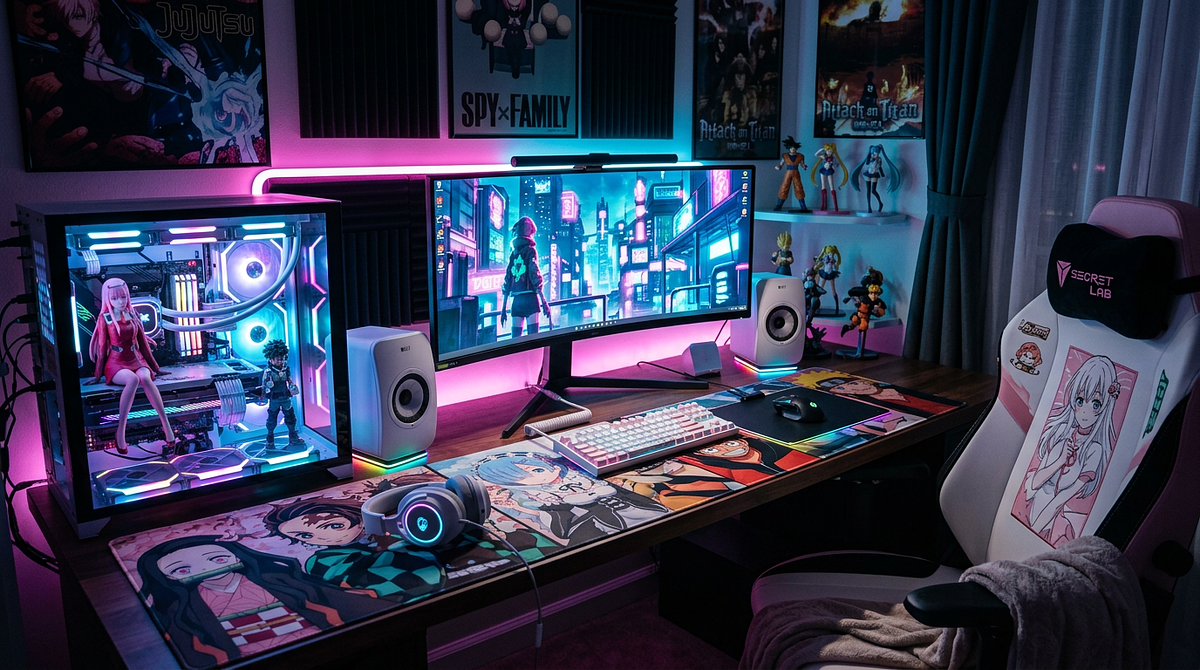
An anime gaming setup combines Japanese pop culture aesthetics with gaming hardware to create a themed workspace built around your favorite series and characters. This guide covers everything from budget-friendly starting points to series-specific design blueprints, including how to choose peripherals, lighting, and décor that work together visually and functionally. By the end, you’ll have a clear plan for building an anime-themed setup that fits your space, your budget, and the look you’re going for.
Anime Gaming Setup: Transform Your Workspace with Japanese-Inspired Design
Core Components That Define Anime Gaming Setups
Building an anime gaming setup starts with understanding five component categories that shape both the look and the function of your workspace. Each one plays a specific role in creating a cohesive themed environment without sacrificing gaming performance.
Desk Foundation and Surface Selection
Your desk is the canvas for your entire setup, so you need enough surface area for monitors, peripherals, and decorative displays. Standard gaming desks run 48 to 60 inches wide, which gives you room for dual monitors alongside a figurine collection. Look for desks with cable management grommets and weight capacities above 150 pounds so they can handle a PC tower, multiple monitors, and collectibles without any structural issues.
Color matters a lot for anime themes. Black desks work well with darker series like Jujutsu Kaisen or Tokyo Ghoul, while white surfaces suit kawaii pink setups or minimalist looks. Wood-tone desks are a safe middle ground that works across multiple anime themes, so you won’t need to replace the desk every time you switch series focus.
RGB Lighting Systems and Atmospheric Control
Lighting sets the mood for an anime gaming setup, and it works best in three layers. LED strip lighting creates a perimeter glow along desk edges and behind monitors, typically using 16.4-foot strips that cost $15 to $25. Smart RGB bulbs handle overhead ambient lighting with app-controlled color changes that match your chosen anime palette. Themed LED neon signs featuring series logos or character silhouettes work as focal point accent pieces in the $25 to $45 range.
Bias lighting behind your monitors cuts eye strain during long sessions and adds depth to the setup. Set those neutral white strips to 20 to 30% intensity so they reduce screen brightness contrast without washing out your theme colors. Running everything through a single ecosystem like Govee or Philips Hue lets you sync colors across all your components at once. For a deeper look at placement strategies and product recommendations, our gaming setup LED lights placement and product guide covers everything from basic strip installs to full room syncing.
Themed Peripherals and Input Devices
Anime-themed peripherals combine gaming performance with visual customization. Extended desk mats, at least 31.5 x 11.8 inches, work as both mouse surfaces and visual anchors, usually featuring series artwork or Japanese aesthetic patterns. They typically cost $12 to $23 and immediately signal your theme to anyone who walks in.
Mechanical keyboards with hot-swappable switches let you install custom anime keycaps without any soldering. If you’re new to this type of keyboard, it helps to understand mechanical keyboard switch types, layouts, and terminology before choosing one for your anime setup. Gaming mice with programmable RGB lighting can match your color scheme, and themed headset stands and controller holders add functional decoration. Pick peripherals based on how you actually use them daily, since these are the things you touch every session.
Display Configuration and Monitor Arrangement
Your monitor setup affects both gaming performance and how the whole space looks. Dual monitor setups let you dedicate one screen to gaming while the second handles Discord, streaming software, or anime wallpaper galleries. Ultra-wide displays give you a single immersive screen with panoramic anime backgrounds.
Your primary gaming monitor should be 24 to 27 inches with a 144Hz or higher refresh rate for competitive play. A vertical secondary monitor can save desk space. Monitor arms let you adjust positioning freely, free up desk surface for collectible displays, and keep your viewing angles comfortable.
Decorative Elements and Collectible Integration
Decoration is what makes the setup feel personal. Place three to six anime figurines on desk risers or floating shelves to create visual interest without blocking your monitors. Wall scrolls, framed posters, or canvas prints of key characters establish the series identity above your workspace.
Themed storage like controller stands and headphone hangers cut clutter while reinforcing the look. Desk plants or LED cloud lights add atmospheric depth. When desk space is limited, go for decorative pieces that also serve a function rather than purely ornamental items.
Budget-Tiered Setup Plans from Starter to Premium
Knowing what to spend at each stage helps you build strategically, starting with high-impact visual components and adding more over time. These three frameworks give you complete setup guidance with realistic price ranges and component priorities.
Starter Tier: $200-350 Foundation
The starter tier focuses on anime aesthetic elements that establish your theme without requiring premium hardware. The budget goes toward visible surface-level components that make an immediate visual impact.
| Component Category | Budget Range | Specific Items |
|---|---|---|
| Desk Mat & Surface | $15-25 | Extended anime desk mat with series artwork |
| RGB Lighting | $30-50 | 16.4ft LED strip kit plus smart bulb |
| Wall Decoration | $40-60 | 2-3 posters or single wall scroll with mounting |
| Basic Peripherals | $50-80 | RGB mouse and entry mechanical keyboard |
| Decorative Accessories | $35-60 | 1-2 prize figures and small LED neon sign |
This tier builds your anime identity through desk mats, lighting, and wall art while keeping your setup fully functional for gaming. Add peripherals and collectibles gradually over 6 to 12 months as your budget allows.
Mid-Range Tier: $500-800 Complete Setup
The mid-range tier brings in quality peripherals, expanded lighting, and a curated collectible display while staying budget-conscious. At this level, you get cohesive anime theming across your whole workspace, which works well for streaming or content creation.
Put $120 to $180 toward a gaming desk with built-in cable management and RGB strip compatibility. Spend $150 to $220 on premium peripherals, including a mechanical keyboard with custom anime keycaps and a wireless gaming mouse. Lighting expands to $80 to $120, covering multi-zone RGB strips, smart bulbs, a medium LED neon sign, and monitor bias lighting.
Set aside $90 to $150 for collectibles, including three to five scale figures with display risers and themed controller stands. Monitor add-ons like arms, webcams with ring lights, or a secondary display will run $60 to $100. Wall art and themed storage, including framed prints, floating shelves, and organizational accessories, costs $50 to $80.
Premium Tier: $1,000-2,000+ Showcase Environment
The premium tier delivers showroom-quality aesthetics with high-end peripherals, an extensive collectible display, a custom PC build, and professional lighting. This level gets you the best of both gaming performance and visual presentation.
Custom desk solutions, including motorized standing desks or built-in RGB, cost $250 to $400. Advanced lighting with Nanoleaf panels, multiple LED neon signs, and a smart ecosystem runs $180 to $280. Premium peripherals, including a custom mechanical keyboard with artisan keycaps, a high-end wireless mouse, and a stream deck, come to $350 to $550.
Dual 27-inch 144Hz monitors or a single ultrawide display with premium arms and professional webcam lighting ranges from $300 to $600. A collectible display with six to ten scale figures, including limited editions in illuminated cases, costs $200 to $350. An anime-themed PC case with custom panels, RGB fans, and matching cable extensions adds $250 to $500. Wall and room decor, including multiple framed prints, floating shelves, LED cloud lights, and themed furniture accents, runs $120 to $200.
Series-Specific Setup Blueprints with Color Coordination
Building an authentic series-themed setup takes coordinated color palettes, matching product choices, and strategic visual references. These blueprints give you complete frameworks for popular anime themes with specific RGB settings and component recommendations.
One Piece: Vibrant Pirate Adventure Aesthetic
One Piece setups lean into bold primary colors and nautical elements that reflect the series’ adventurous spirit. Use vibrant red (#DC143C) and ocean blue (#1E90FF) as your primary colors, with sunny yellow (#FFD700) and straw hat beige (#F5DEB3) as accents. Set your RGB to alternate red and blue zones with yellow accent lighting.
Pick an extended desk mat featuring Straw Hat crew artwork or Going Merry ship designs. Put up an LED neon sign with the Straw Hat Jolly Roger or “King of the Pirates” text. Place a Luffy figure in Gear 5 or an iconic pose as your central focal point, with Zoro and other crew members flanking your monitors. Mount wanted posters for Luffy, Zoro, and Sanji in a grid above your displays. Go with red and blue keycaps and a custom Jolly Roger escape key.
Jujutsu Kaisen: Modern Dark Minimalism
JJK setups use a sophisticated dark palette with strategic purple and blue accents that lean into sleek minimalism. Build your foundation with deep black (#0A0A0A) and charcoal gray (#36454F) as primary colors. Add Gojo blue (#00BFFF) and cursed purple (#8B00FF) as accents through RGB settings, with purple underglow and blue monitor backlighting kept at low brightness.
Use a black extended desk mat with subtle cursed energy patterns or character silhouettes. Put up an LED neon sign with Gojo’s Six Eyes symbol or Domain Expansion visuals. Display Gojo Satoru blindfold versions, Sukuna, and Megumi figures with symmetrical balance. Mount minimalist character portraits or Domain Expansion scenes in black frames horizontally above the setup. Go with a black keyboard case and purple and blue keycaps to keep the look clean.
Kawaii Pink: Soft Pastel Gaming Environment
Kawaii setups lean into soft, cute aesthetics through pastel palettes and adorable character designs. Use soft pink (#FFB6C1) and cream white (#FFFDD0) as primary colors, with lavender (#E6E6FA) and mint green (#98FF98) as accents. Set your RGB to a warm pink glow with white highlights at low intensity for a soft, dreamy feel.
Choose a pink extended desk mat with cherry blossom, cat, or kawaii character patterns. Add LED cloud lights or a star projector for atmospheric effects. Display Nendoroids or chibi-style characters from your favorite series across desk surfaces and shelves. Hang pastel anime prints with fairy lights and floating shelves holding plushies. Go with a white or pink keyboard case and pastel keycap sets with cute artisan keycaps. Add soft textures through a mouse wrist rest, round shapes, and plants or faux flowers.
Naruto: Orange and Blue Ninja Theme
Naruto setups balance energetic orange tones with calming blue accents and ninja village aesthetics. Use Naruto orange (#FFA500) and Konoha blue (#4169E1) as primary colors, with Sharingan red (#DC143C) and forest green (#228B22) as accents. Set your RGB to orange desk lighting and blue monitor backlighting with dynamic transitions.
Pick an extended desk mat featuring Team 7, Akatsuki clouds, or Hidden Leaf village symbols. Put up an LED neon sign with the Konoha village symbol, a Sharingan design, or character silhouettes. Place Naruto Sage Mode or Hokage figures centrally, with Sasuke, Kakashi, and Itachi on opposite monitor sides to create a rival dynamic. Mount village symbols prominently above the setup with character evolution posters or battle scenes. Go with orange and blue keycap combinations and custom clan symbol keys. Add a headband replica or kunai display piece for an authentic ninja atmosphere.
Assembly Process and Layout Optimization Strategies
The order you assemble your setup and how you plan the layout both matter. Getting this right prevents cable clutter and makes sure your desk space works for gaming and display without one getting in the way of the other.
Foundation Setup and Cable Management
Start with desk positioning and cable management before you add any decorative elements. Place your desk against a wall with access to multiple power outlets, leaving 6 to 12 inches of clearance behind it for cable routing. Mount power strips with surge protection underneath the desk surface using adhesive mounts.
Attach LED strips along the desk perimeter and behind monitors before connecting peripherals. Route RGB controller cables through desk grommets to power strips, and test your color settings before you mount anything permanently. Install monitor arms or position stands while routing display cables, power cords, and USB connections through cable management sleeves or raceways. Secure excess cable length with velcro ties behind monitors.
Run keyboard, mouse, and headset cables through a single cable management channel to your PC. Use cable clips every 8 to 12 inches to keep things tidy. Check that your monitors, RGB lighting, and peripherals all work before you move on to decorative placement.
Decorative Element Positioning
Placing figurines and accessories thoughtfully creates visual balance without eating into your functional workspace. Put one to two primary figurines on either side of your main monitors at eye level to create symmetrical focal points without blocking your screen. Place LED neon signs or larger collectibles in the rear corners of your desk to use vertical space while keeping your primary gaming area clear.
Use monitor risers or small platforms to elevate background figurines and create depth so the display doesn’t look flat. Pick themed accessories that also serve a function, like controller stands, headphone hangers, and cable holders, to cut clutter while reinforcing the look. Keep your viewing distance 20 to 26 inches from your primary monitor to your seat. Keep your keyboard and mouse within comfortable reach. Put frequently used items in easy arm’s reach.
Lighting Configuration and Atmosphere Creation
Layering your lighting correctly builds the anime theme while protecting your eyes during long gaming sessions. Set overhead smart bulbs or room lighting to warm white (2700 to 3000K) at 40 to 60% brightness for base illumination without harsh glare. Set desk LED strips to your theme colors at 30 to 50% intensity for atmospheric glow without overwhelming the workspace.
Put neutral white (6500K) LED strips behind your monitors at low intensity (20 to 30%) to reduce eye strain from screen brightness contrast. Create scene presets for different activities: dynamic colors for gaming, neutral white for work, and theme colors for streaming. Keep RGB saturation below 70% to avoid visual fatigue. Point LED strips at walls or surfaces for indirect glow rather than aiming them directly at your eyes.
Performance Preservation with Anime Aesthetic Integration
A good anime gaming setup looks great and still functions well for gaming. The goal is to keep your ergonomics and performance intact while achieving a setup you’re proud to show off. Decorative elements shouldn’t get in the way of actually playing.
Choose desk mats with wrist rest support to keep your hands in a neutral position during long sessions. Position monitors at arm’s length with the top edge at or slightly below eye level, regardless of any decorative framing around them. Keep a clear 24-inch zone in the center of your desk for active gaming peripherals, and push collectibles to the outer areas.
If you’re using an anime-themed PC case, make sure it still has at least two intake and two exhaust fans for proper airflow. Check that custom case panels or vinyl wraps don’t block ventilation mesh or fan mounting points. Leave 3 to 4 inches of clearance between your PC tower and the wall so heat can escape. Check your GPU and CPU temperatures after any aesthetic modifications and adjust fan curves if needed.
Route cables through desk grommets so you can still swap peripherals and troubleshoot without a mess. Use velcro ties instead of zip ties so you can reconfigure cables easily during upgrades. Label cables at connection points so future component changes don’t require untangling your entire setup. Leave 6-inch service loops behind the desk for each cable to prevent tension when you make adjustments.
Creating Authentic Anime Gaming Environments Through Strategic Planning
Building an anime gaming setup that authentically represents your favorite series takes balancing immediate visual impact with long-term functionality and room to grow. Put your initial money into foundational lighting and an extended desk mat to establish the theme, then let your peripheral and decorative choices develop the personality over time. Start with your chosen series color palette, pick two to three signature collectibles as focal points, and build outward from there rather than buying scattered pieces without a clear vision. Keep ergonomics and gaming performance in mind throughout the process so you end up with a themed workspace that’s actually comfortable to use for long sessions.
Frequently Asked Questions About Anime Gaming Setups
What’s the minimum budget needed to create a recognizable anime gaming setup?
You can establish a recognizable anime theme for $150 to $200 by focusing on an extended anime desk mat ($15 to $25), basic RGB LED strips ($20 to $30), one to two wall posters ($15 to $30), and a small LED neon sign or figurine ($40 to $80). That combination creates immediate visual identity without a complete workspace overhaul.
How do I choose between different anime series themes for my setup?
Go with the series you’ve rewatched most or that means the most to you, since you’ll be looking at this setup every day for months or years. Also consider whether the color palette works with your existing room decor and whether themed merchandise is available in your budget range.
Can I mix multiple anime series in one gaming setup?
Mixing series works best when they share compatible color palettes, like Naruto and Dragon Ball both using orange and blue, or when you create distinct zones for each series rather than scattering conflicting themes across your desk.
What’s the best way to display anime figures without blocking my monitors?
Place figures on the sides of your monitors at desk edges, use floating shelves mounted above your setup, or put monitor risers behind your screens to create elevated display platforms while keeping your viewing angles clear.
How often should I update or refresh my anime gaming setup?
Rotate seasonal decorations every three to four months, swap desk mats or wallpapers when new series content drops, and plan bigger upgrades like peripherals or collectibles once a year to keep things feeling fresh without constant spending.
Where should I buy anime gaming accessories for best value?
Amazon, Etsy, and AliExpress each serve a different need: broad selection, custom pieces, and budget finds respectively. Conventions are still the best place to find truly exclusive merchandise. Knowing which platform matches your goal saves both money and disappointment, so if you’re ready to build your setup, browse our curated gaming setup accessories guide to find the best picks across every budget.